> For the complete documentation index, see [llms.txt](https://support.tiger.com/llms.txt). Markdown versions of documentation pages are available by appending `.md` to page URLs; this page is available as [Markdown](https://support.tiger.com/english/readme.md).
# Welcome!
Tiger.com Windows
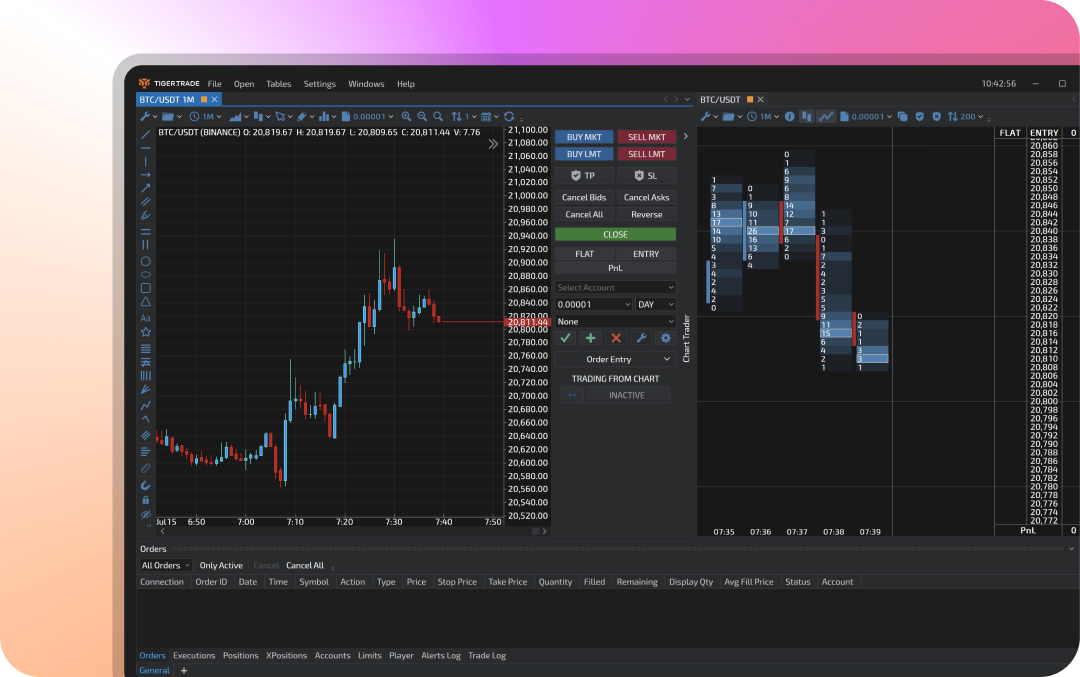
[Tiger.com Windows](https://www.tiger.com/terminal) is a trading terminal, which has already been chosen by over 200,000 users. The platform allows trading cryptocurrencies, stocks, futures, and Forex pairs and will suit traders with any strategy: from scalpers to investors.
In the terminal, users can connect to the world's best cryptocurrency exchanges — Binance, Bybit, OKX, and many others. Stock exchanges, such as NYSE, NASDAQ, CME, MOEX, and others, can be also accessed through the third-party terminals TWS, Rithmic, MetaTrader 5, QUIK and others in Tiger.Trade Windows terminal.
The terminal offers an extensive list of features for professional and efficient trading, including:
* [Depth of Market](/english/windows/dom.md) with fully customizable settings, clusters, trades feed, as well as filtering and notifications which are especially useful for scalpers.
* [Chart](/english/windows/chart.md) allowing to display 5 chart types with custom timeframes, including classic candles, 30 cluster types, over 60 unique indicators and multiple graphical objects for in-depth market analysis.
* [Watchlist](/english/windows/watchlist.md), which allows monitoring the market and grouping instruments by various characteristics.
* [Simulator and Player](/english/settings/trading-modes.md) training modes to test strategies on real and historical data using built-in demo accounts.
* [Risk manager](/english/tables/limits.md), which allows to automatically place Stop Loss, Take Profit and Trailing orders, as well as control risks by limiting the maximum drawdown, the number of losing trades and other parameters.
---
# Agent Instructions
This documentation is published with GitBook. GitBook is the documentation platform designed so that both humans and AI agents can read, navigate, and reason over technical content effectively. Learn more at gitbook.com.
## Querying This Documentation
If you need additional information that is not directly available in this page, you can query the documentation by asking a question.
Perform an HTTP GET request on the following URL with the `ask` and `goal` query parameters:
```
GET https://support.tiger.com/english/readme.md?ask=&goal=
```
`ask` is the immediate question: it should be specific, self-contained, and written in natural language.
`goal` is what the user is ultimately trying to achieve, the reason they need the answer. Sharing it helps GitBook give you a better, more relevant answer. A goal is most helpful when it describes the outcome the user wants rather than restating the question. For example, with `ask=how do I create an API token`, a goal like `automate deployments from our CI pipeline` lets GitBook tailor the answer to that use case.
The response will contain a direct answer to the question and relevant excerpts and sources from the documentation.
Use this mechanism when the answer is not explicitly present in the current page, you need clarification or additional context, or you want to retrieve related documentation sections.