> For the complete documentation index, see [llms.txt](https://support.tiger.com/llms.txt). Markdown versions of documentation pages are available by appending `.md` to page URLs; this page is available as [Markdown](https://support.tiger.com/nastroiki/osnovnye-deistviya/kak-otkryt-instrument-na-vsekh-kriptobirzhakh.md).
# Как открыть инструмент на всех криптобиржах?
Одной командой можно быстро открыть стаканы и графики конкретного инструмента на всех подключенных криптобиржах.
Вызов функции осуществляется в следующих разделах:
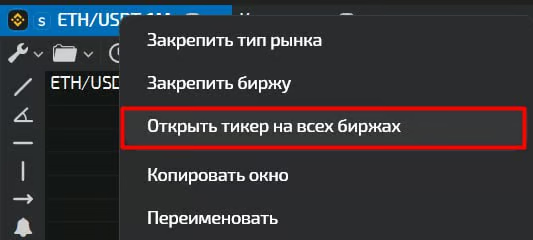
* Правый клик на вкладке окна с инструментом → `Открыть тикер на всех биржах`;
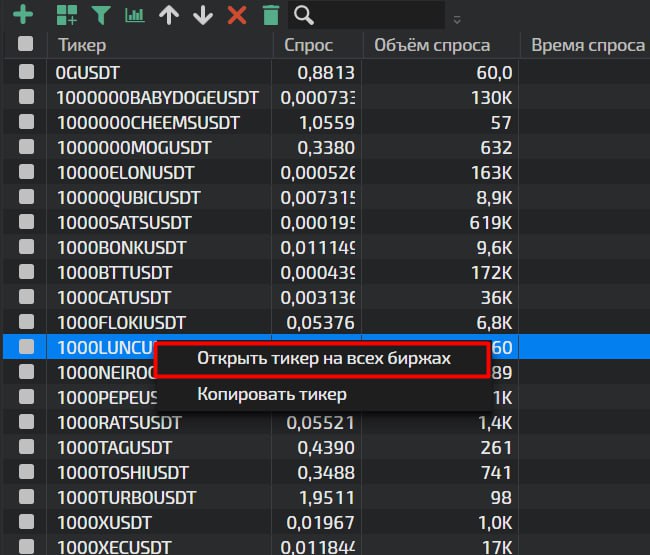
* Котировки, скринер → Правый клик на инструменте → `Открыть тикер на всех биржах`;
* Котировки, скринер → Через отдельную иконку на панели инструментов;
### Настройка параметров открытия инструментов
В терминале доступна тонкая настройка параметров, которые будут применяться при открытии инструментов. Чтобы перейти к этим настройкам выполните:
Настройки → Основные настройки → вкладка “Все” → Открытие тикера на всех биржах:
#### Список параметров
* **Открывать в окне** - можно выбрать, как будет открываться комбоокно:
Отдельное окно - открывается в новом окне.
Вкладка главного окна - открывается как новая вкладка в главном рабочем пространстве.
Вкладка окна - открывается как новая вкладка в текущем активном окне.
* **Ширина колонки стакана** - параметр, который задает ширину для окна стакана в пикселях
* **Высота ряда стаканов** - указать высоту окон стаканов при открытии инструмента
* **Высота ряда графиков** - указать высоту окон графиков при открытии инструмента
* **Размещение графика** - указать область, где будет размещен график (Под стаканом/Над стаканом)
### Порядок бирж
Порядок бирж в списке определяет, в какой последовательности будут открываться окна для каждой биржи. Установить порядок бирж можно ”перетаскиванием” названий бирж вверх или вниз:
**Колонка «График»** определяет, какие данные будут отображаться в окне графика для каждой биржи:
* Без графика
* Спот
* Фьючерс
* Все рынки
**Переключатели S и F** управляют открытием стаканов для разных типов инструментов: S — открывает стакан для спота, F — открывает стакан для фьючерсов.
### Как управлять темами и настройками при открытии инструмента на всех биржах?
При использовании опции «Открыть тикер на всех биржах» стаканы и графики открываются с определёнными визуальными настройками. Чтобы управлять этим процессом, следуйте инструкции ниже.
#### 1️⃣ Темы для графиков и стаканов
При открытии инструмента на всех биржах используются темы, которые установлены в разделах: *Настройки → Основные настройки → **График** → Тема* и *Настройки → Основные настройки → **Стакан** → Тема.*
В списке выбора темы также доступны ранее сохранённые шаблоны. Подробнее о создании и редактировании тем читайте в статье:
#### 2️⃣ Настройка параметров для всех стаканов сразу
В разделе Настройки → Настройки стакана на верхней панели вы можете задать единые настройки для всех стаканов, включая те, которые ещё не настраивались.
Чтобы применить их ко всем инструментам без исключения:
1. Перейдите в Настройки → Настройки стакана
2. Нажмите «Применить по умолчанию».
3. Откройте раздел Настройки → Настройки стакана еще раз
4. Затем нажмите «Применить»
#### 3️⃣ Наследованние настроек
Для опции "Открыть тикер на всех биржах" настройки будут наследоваться из окна, где была использована данная опция.\
\
При использовании опции "Открыть тикер на всех биржах", графики инструмента откроются с такими же индикаторами, которые присутствовали в исходном окне "График", с которого был произведён вызов опции. Настроить список индикаторов по умолчанию для данной опции не получится, но вы можете сохранить пресет нужного графика с индикаторами в шаблон, после чего применять его на новые графики.
---
# Agent Instructions
This documentation is published with GitBook. GitBook is the documentation platform designed so that both humans and AI agents can read, navigate, and reason over technical content effectively. Learn more at gitbook.com.
## Querying This Documentation
If you need additional information that is not directly available in this page, you can query the documentation by asking a question.
Perform an HTTP GET request on the following URL with the `ask` and `goal` query parameters:
```
GET https://support.tiger.com/nastroiki/osnovnye-deistviya/kak-otkryt-instrument-na-vsekh-kriptobirzhakh.md?ask=&goal=
```
`ask` is the immediate question: it should be specific, self-contained, and written in natural language.
`goal` is what the user is ultimately trying to achieve, the reason they need the answer. Sharing it helps GitBook give you a better, more relevant answer. A goal is most helpful when it describes the outcome the user wants rather than restating the question. For example, with `ask=how do I create an API token`, a goal like `automate deployments from our CI pipeline` lets GitBook tailor the answer to that use case.
The response will contain a direct answer to the question and relevant excerpts and sources from the documentation.
Use this mechanism when the answer is not explicitly present in the current page, you need clarification or additional context, or you want to retrieve related documentation sections.

 #### Список параметров
* **Открывать в окне** - можно выбрать, как будет открываться комбоокно:
Отдельное окно - открывается в новом окне.
Вкладка главного окна - открывается как новая вкладка в главном рабочем пространстве.
Вкладка окна - открывается как новая вкладка в текущем активном окне.
* **Ширина колонки стакана** - параметр, который задает ширину для окна стакана в пикселях
* **Высота ряда стаканов** - указать высоту окон стаканов при открытии инструмента
* **Высота ряда графиков** - указать высоту окон графиков при открытии инструмента
* **Размещение графика** - указать область, где будет размещен график (Под стаканом/Над стаканом)
### Порядок бирж
Порядок бирж в списке определяет, в какой последовательности будут открываться окна для каждой биржи. Установить порядок бирж можно ”перетаскиванием” названий бирж вверх или вниз:
#### Список параметров
* **Открывать в окне** - можно выбрать, как будет открываться комбоокно:
Отдельное окно - открывается в новом окне.
Вкладка главного окна - открывается как новая вкладка в главном рабочем пространстве.
Вкладка окна - открывается как новая вкладка в текущем активном окне.
* **Ширина колонки стакана** - параметр, который задает ширину для окна стакана в пикселях
* **Высота ряда стаканов** - указать высоту окон стаканов при открытии инструмента
* **Высота ряда графиков** - указать высоту окон графиков при открытии инструмента
* **Размещение графика** - указать область, где будет размещен график (Под стаканом/Над стаканом)
### Порядок бирж
Порядок бирж в списке определяет, в какой последовательности будут открываться окна для каждой биржи. Установить порядок бирж можно ”перетаскиванием” названий бирж вверх или вниз:

 **Переключатели S и F** управляют открытием стаканов для разных типов инструментов: S — открывает стакан для спота, F — открывает стакан для фьючерсов.
 ### Как управлять темами и настройками при открытии инструмента на всех биржах?
При использовании опции «Открыть тикер на всех биржах» стаканы и графики открываются с определёнными визуальными настройками. Чтобы управлять этим процессом, следуйте инструкции ниже.
#### 1️⃣ Темы для графиков и стаканов
При открытии инструмента на всех биржах используются темы, которые установлены в разделах: *Настройки → Основные настройки → **График** → Тема* и *Настройки → Основные настройки → **Стакан** → Тема.*
В списке выбора темы также доступны ранее сохранённые шаблоны. Подробнее о создании и редактировании тем читайте в статье:
### Как управлять темами и настройками при открытии инструмента на всех биржах?
При использовании опции «Открыть тикер на всех биржах» стаканы и графики открываются с определёнными визуальными настройками. Чтобы управлять этим процессом, следуйте инструкции ниже.
#### 1️⃣ Темы для графиков и стаканов
При открытии инструмента на всех биржах используются темы, которые установлены в разделах: *Настройки → Основные настройки → **График** → Тема* и *Настройки → Основные настройки → **Стакан** → Тема.*
В списке выбора темы также доступны ранее сохранённые шаблоны. Подробнее о создании и редактировании тем читайте в статье:
