> For the complete documentation index, see [llms.txt](https://support.tiger.com/llms.txt). Markdown versions of documentation pages are available by appending `.md` to page URLs; this page is available as [Markdown](https://support.tiger.com/okna/grafik/osnovnye-indikatory-okna-grafik/maximum-levels.md).
# Maximum Levels
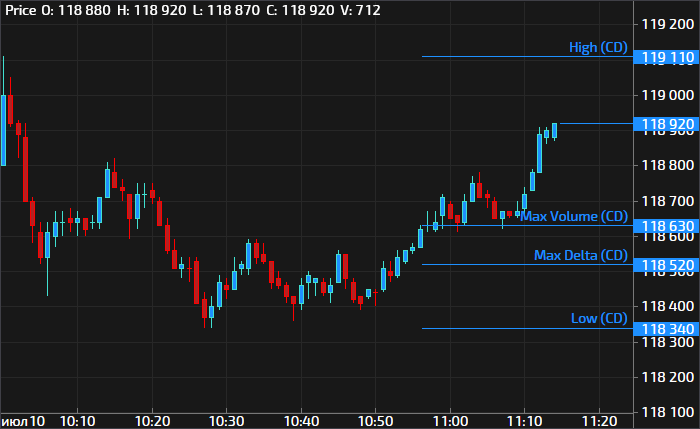
Отображает уровни выбранных типов за определённый интервал времени.
Эти уровни могут служить ориентирами при анализе рынка и выступать в качестве ключевых.
## Настройки индикатора

### Параметры
| Название | Описание |
| ----------- | ---------------------------------------------------------------------------------------------------------------------------------------------------------------------- |
| Период | Выбор периода, за который будет осуществляться построение уровней: Текущий день, Прошлый день, Текущая неделя, Прошлая неделя, Текущий месяц, Прошлый месяц, Контракт. |
| Длина линии | Указание длины линии обозначения уровня (в пикселях). |
| Подписи | Включение или отключение подписи для уровня. |
### Стиль
| Название | Описание |
| ------------- | ------------------------------------------------------------------------------------------- |
| Цвет линии | Выбор цвета для отображения уровня. |
| Толщина линии | Указание толщины линии уровня. |
| Стиль линии | Выбор типа отображения линии уровня: Сплошная, Штрихи, Точки, Штрих-точка, Штрих-две точки. |
### Уровни
| Название | Описание |
| ---------- | ---------------------------------------------------------------------------------- |
| Max Volume | Включение или отключение отображения уровня максимального объёма. |
| Max Trades | Включение или отключение отображения уровня максимального количества трейдов. |
| Max Bid | Включение или отключение отображения уровня максимального объёма рыночных продаж. |
| Max Ask | Включение или отключение отображения уровня максимального объёма рыночных покупок. |
| Max Delta | Включение или отключение отображения уровня максимальной положительной дельты. |
| Min Delta | Включение или отключение отображения уровня максимальной отрицательной дельты. |
| High | Включение или отключение отображения уровня максимума цены. |
| Low | Включение или отключение отображения уровня минимума цены. |
### Индикатор
| Название | Описание |
| --------- | --------------------------------------------------------------------------------- |
| Индикатор | Включение или отключение отображения индикатора на графике. |
| Название | Включение или отключение отображения названия индикатора в информационной строке. |
| Маркеры | Включение или отключение отображения маркеров индикатора на шкале. |
| Область | Выбор области для отображения индикатора. |
---
# Agent Instructions
This documentation is published with GitBook. GitBook is the documentation platform designed so that both humans and AI agents can read, navigate, and reason over technical content effectively. Learn more at gitbook.com.
## Querying This Documentation
If you need additional information that is not directly available in this page, you can query the documentation by asking a question.
Perform an HTTP GET request on the following URL with the `ask` and `goal` query parameters:
```
GET https://support.tiger.com/okna/grafik/osnovnye-indikatory-okna-grafik/maximum-levels.md?ask=&goal=
```
`ask` is the immediate question: it should be specific, self-contained, and written in natural language.
`goal` is what the user is ultimately trying to achieve, the reason they need the answer. Sharing it helps GitBook give you a better, more relevant answer. A goal is most helpful when it describes the outcome the user wants rather than restating the question. For example, with `ask=how do I create an API token`, a goal like `automate deployments from our CI pipeline` lets GitBook tailor the answer to that use case.
The response will contain a direct answer to the question and relevant excerpts and sources from the documentation.
Use this mechanism when the answer is not explicitly present in the current page, you need clarification or additional context, or you want to retrieve related documentation sections.